WordPress’s Gutenberg project cut its Playwright test runtime by 34% — from 35 minutes to 23 — simply by balancing its test shards. With Playwright 1.62, you can now apply the same technique to your own test suite.
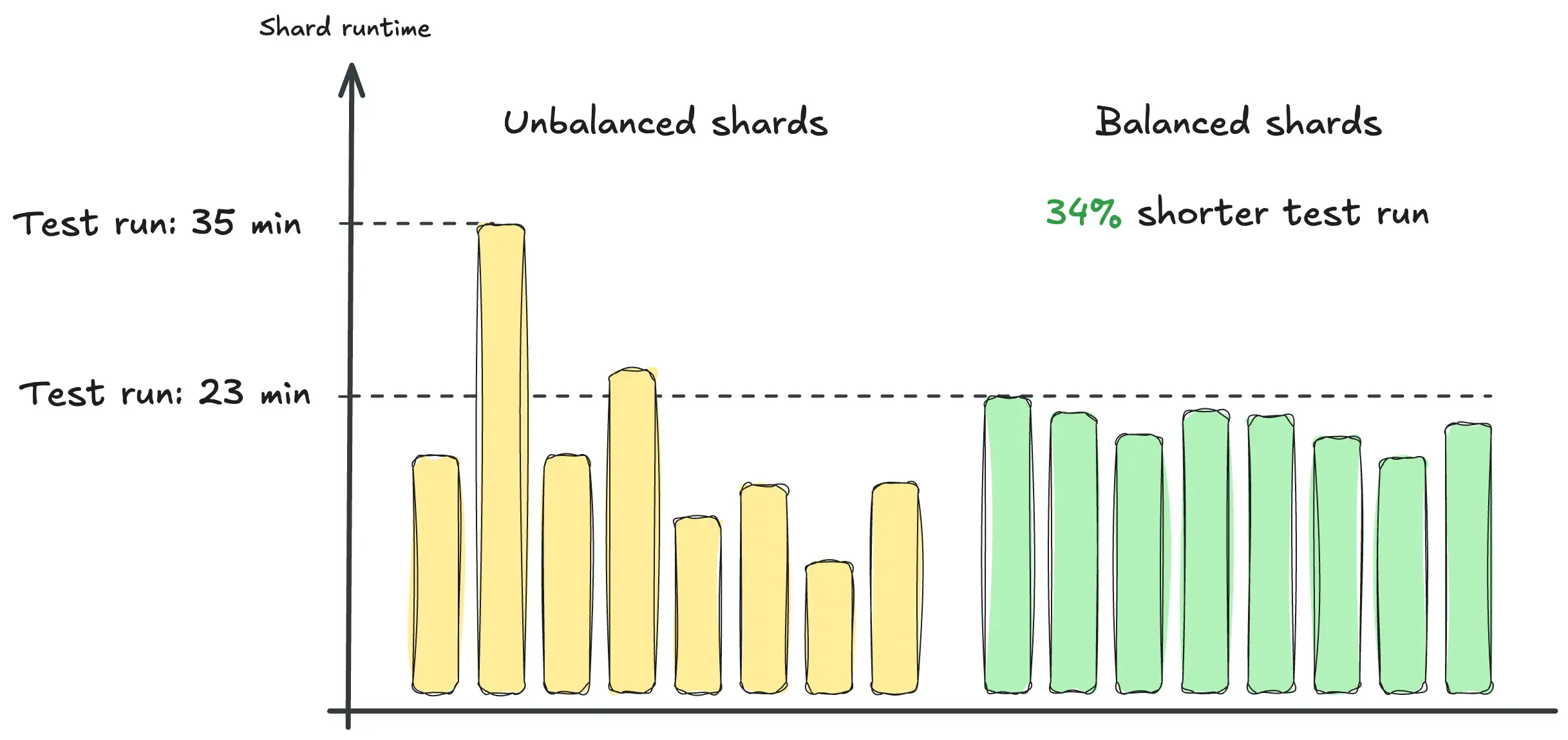
Table of contents
Open Table of contents
Before and after
WordPress/Gutenberg is the project behind the WordPress block editor. It’s a large, actively developed open-source codebase that runs about 2,000 Playwright tests on every pull request.
The tests were split across eight shards, but the end-to-end run still took about 35 minutes on average. Here’s a typical example:
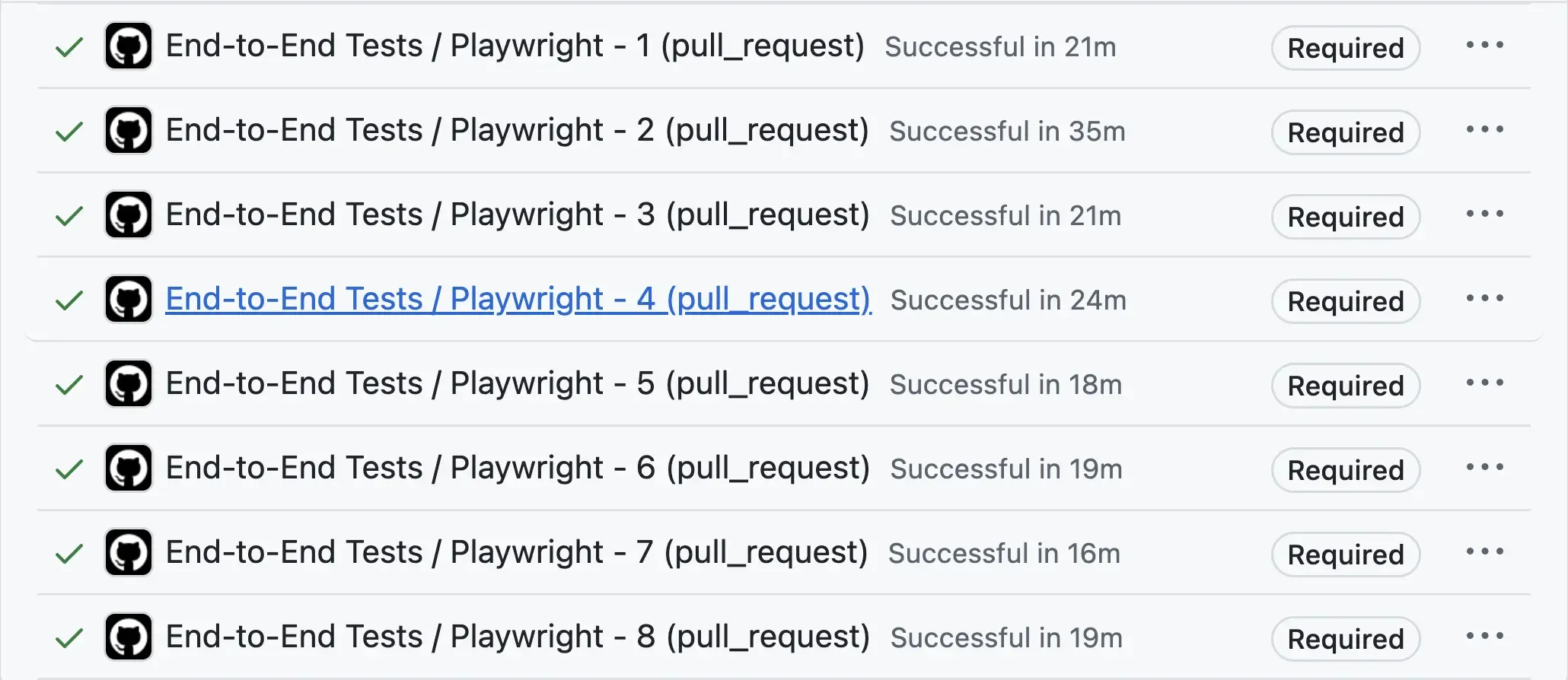
Based on the work across all shards, the theoretical minimum was about 22 minutes.
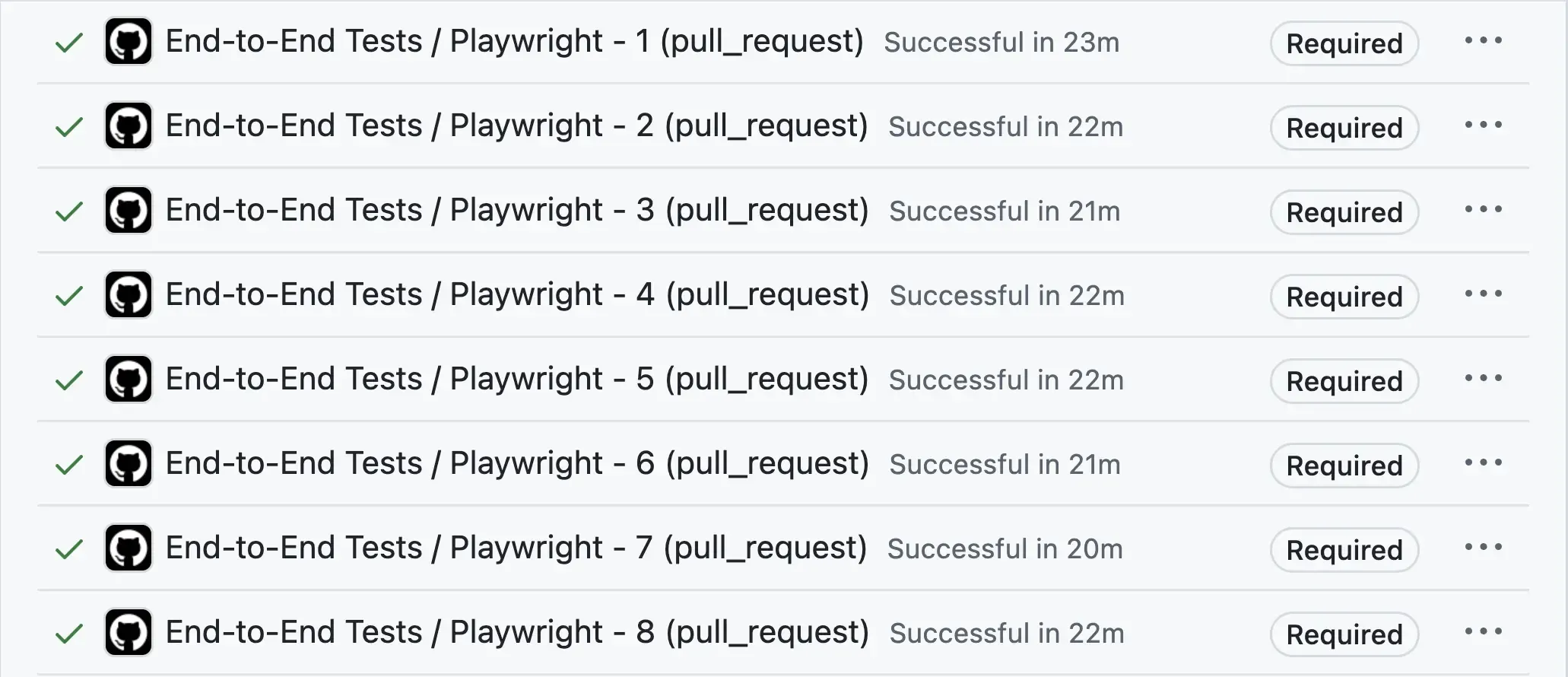
After the change was merged, duration-based shard balancing became the default for Gutenberg’s end-to-end test runs. They now complete in about 23 minutes on average — just one minute above that minimum.
Here’s a typical example:
Getting started
Playwright 1.62 shipped a new low-level API that allows custom reporters to assign tests to shards.
The @flakiness/playwright reporter now uses this API to implement shard balancing based on historical test-duration data. The reporter happily coexists with your existing reporters, so you can use it solely to balance shards.
@flakiness/playwright is self-contained and MIT-licensed. You do not need a Flakiness.io account to use the reporter.
Under the hood
The shard-balancing algorithm is described in details here:
To balance your shards, follow these steps:
-
Use Playwright Test 1.62 or later and Node.js 20 or later.
-
Install and configure @flakiness/playwright as one of your reporters.
The reporter is a regular npm package:
npm install -D @flakiness/playwrightNext, add it to the
reporterarray inplaywright.config.ts:import { defineConfig } from "@playwright/test"; export default defineConfig({ reporter: [ ["@flakiness/playwright"], ], }); -
Generate test-duration data and store it in a
timings.jsonfile. There are a few ways to do this, covered below. -
Configure @flakiness/playwright to use the test-duration file for shard balancing.
In your
playwright.config.ts, add the following to the reporter options:import { defineConfig } from "@playwright/test"; export default defineConfig({ reporter: [ [ "@flakiness/playwright", { shardBalancing: { timingsFile: "./timings.json" }, }, ], ], });
That’s it! Now, whenever you run Playwright with --shard, the shard balancing algorithm will distribute tests among shards using the historical durations stored in timings.json.
Generating historical test-duration data
To balance shards efficiently, we need historical test-duration data. In this guide, we’ll store this information in a timings.json file.
timings.json should be committed to the repository — treat it similarly to package-lock.json. For large projects, timings.json can reach 500 KB in size, but it compresses extremely well and won’t add much storage overhead to your Git repository.
There are three ways to generate this data, pick one that suits you best. All three use the flakiness-playwright-timings utility bundled with the Flakiness reporter.
1. Simple but slow
The easiest approach is to run the full test suite and generate a report:
npx playwright testThe Flakiness reporter will automatically generate a Flakiness JSON report and save it to ./flakiness-report/report.json. This file stores all the information about your test run, including test durations.
Did you know?
These Flakiness reports can be viewed as rich, interactive HTML reports:
npx flakiness show ./flakiness-report/report.jsonThis report can be used directly as shardBalancing.timingsFile, but it contains much more than test durations.
It’s better to distill it:
# Build timings.json containing test durations only
npx flakiness-playwright-timings build -o timings.json ./flakiness-report/report.json
This will create a new timings.json file that contains only test names and their durations.
While this method works, it requires you to run all your tests, which might take hours on your local machine.
2. Fast but involved
Why run all your tests locally if your CI pipeline already runs them across multiple shards?
Instead, we can configure CI to upload all the flakiness reports as artifacts. We can then download them and use the flakiness-playwright-timings utility to combine them into a single timings.json file.
For example, if you’ve downloaded the reports from all your shards as report-shard-1.json, report-shard-2.json, and so on, you can run:
npx flakiness-playwright-timings build -o timings.json report-shard-*.json3. Fast and simple
The obvious downside of the previous method is having to configure CI: no one likes touching those YAML files.
If you use Flakiness.io, the service already stores a detailed history of your tests, including their durations. The flakiness-playwright-timings command supports a fetch subcommand that downloads timings.json from Flakiness.io for your test suite:
npx flakiness-playwright-timings fetch -o timings.json -c playwright.config.tsWhat you should see
Once shard balancing is enabled, each test run will print a short summary of shard balancing.
For example:
[flakiness.io] balancing 3 shards
[flakiness.io]   timings file:   /repo/timings.json
[flakiness.io]   duration hints: 412/430 tests (96%), the rest default to 1.0s
[flakiness.io]   shard loads:    1=8m 12s, 2=8m 40s, 3=8m 51s
[flakiness.io]   balance:        96%
[flakiness.io] Running shard 2/3: 8m 40s of work, ~2m 10s across 4 workers
And at the end of the run, you’ll get a summary:
[flakiness.io] Shard 2/3 finished: predicted 8m 40s of work, actual 9m 12s (+6%)A detailed explanation of the output is available in the documentation. The key idea is that if the balance is low or duration hints don’t cover many of your tests, you should regenerate timings.json.
You don’t need to update timings.json often. The shard allocation algorithm handles tests without duration hints gracefully; as the file grows stale, shards gradually become less balanced, eventually approaching count-based allocation.
Debugging
Balanced sharding regroups tests: tests that used to share a shard may now run separately, and tests that never met before may now run together. If a shard starts failing after rebalancing — even though the same tests pass with Playwright’s native --shard — the usual culprit is a hidden dependency between tests: one test relies on state (a file, a database row, a signed-in session) that another test happens to set up or clobber.
Of course, in a perfect world, all tests are “hermetic,” but this is rarely the case. We published a detailed guide to debugging and fixing these failures:
Coding agents are also pretty good at fixing these issues because the closed feedback loop lets them iterate.
Wrapping up
With shard balancing, Gutenberg’s pull request test run went from 35 minutes down to 23 minutes, with no extra compute — just a timings.json file and a few lines in the Playwright config.
The @flakiness/playwright reporter is free and open source, and we’d love to hear how it works for your project — file an issue or reach out on X at @flakinessio.
And if you’d like your timings.json to always be one fetch command away — along with the full history of your tests — check out the service behind the reporter:
Happy coding!
Flakiness.io Team